Case Study
The Table Map
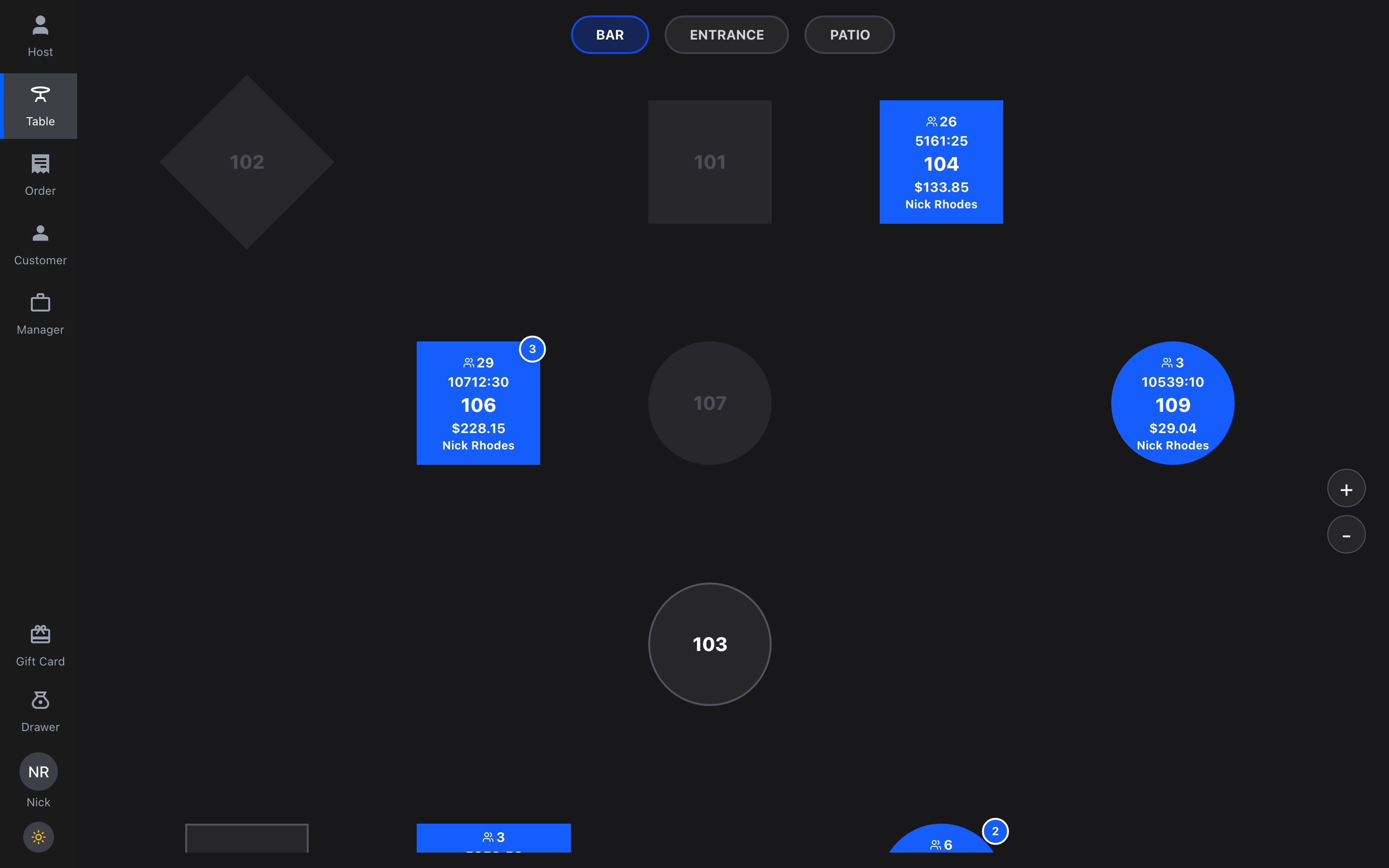
SkyTab's table management rebuilt as a live interactive map, and tested with a working prototype instead of a scripted one.
Role: Product design, functional prototyping · Shift4, 2025
The problem
A live table map, and no honest way to test it
We wanted to rebuild SkyTab POS table management around a live interactive map: servers see their sections and every table's state at a glance, pick a table, start an order, and take payment without leaving the floor view.
The problem was how to test it. Our prototypes had always been carefully curated click-throughs: we'd build exactly one pathway and walk servers down it. A scripted prototype can only confirm the script. It can't tell you what a server does when nobody has laid out the path, and that's the only behavior that predicts how a redesign performs during a dinner rush.
The prototype
About two days in Cursor, with a real backend
So instead of another click-through, I built the design as working software: a prototype written with Cursor in about two days, with Supabase behind it holding real table and order data. Because the backend was real, there was no script to fall off. Testers could open any section, any table, any ticket, in any order, and the prototype kept up.
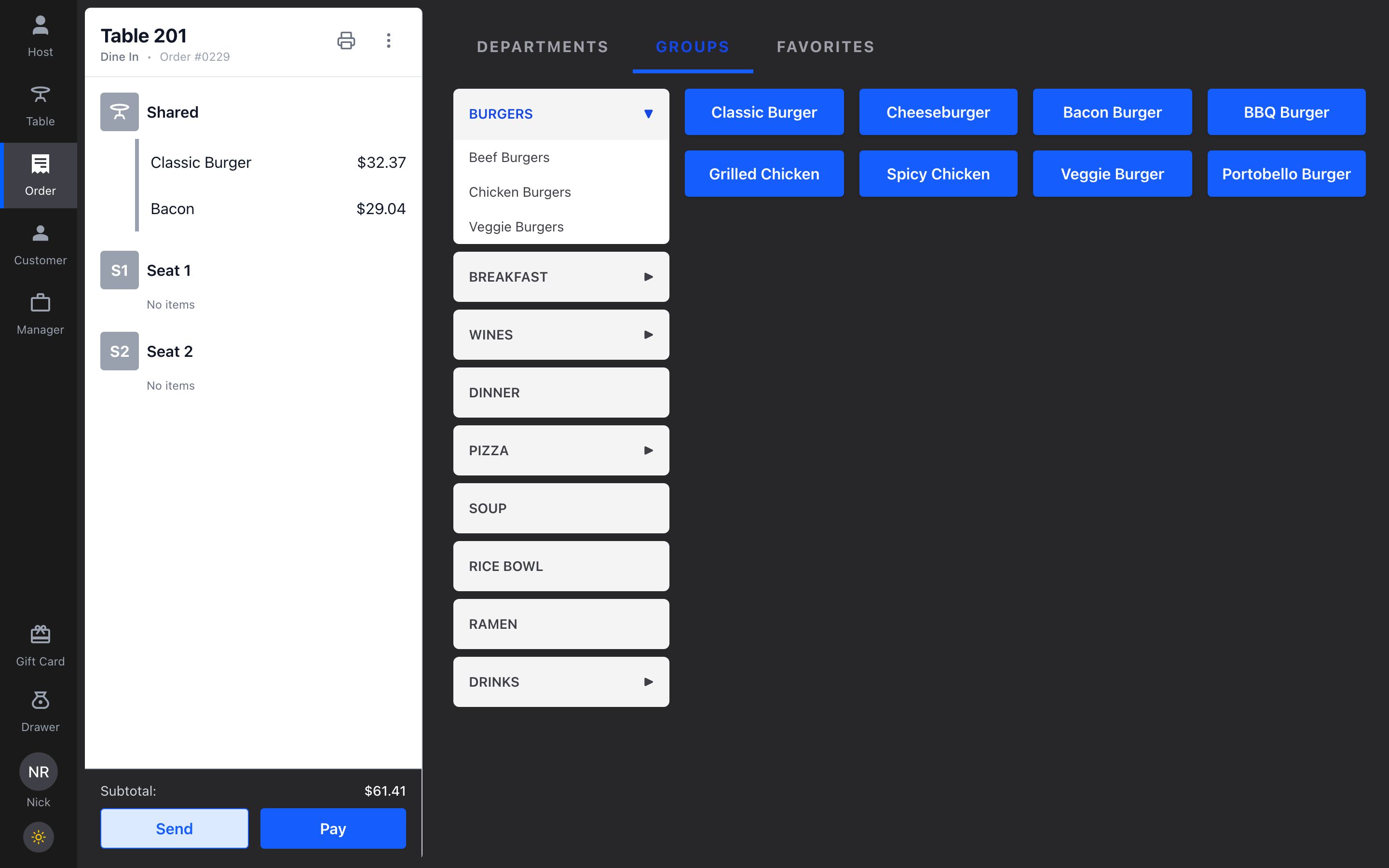
I developed the entire order input flow, table selection, payment initiation, and the new side-tab navigation, working end to end.
The process
Figma designs
the new table map
Working prototype
Cursor + Supabase
Field testing
six restaurants
Production
shipped with refinements
The unusual step is the second one: a functional prototype with a real backend, so field testing could be spontaneous instead of scripted.
The design
Table selection, order entry, and payment initiation
From the map, a table opens its ticket: shared items and per-seat items, running subtotal, and the actions a server actually needs, send, pay, reopen. Order entry uses department and group navigation with large tap targets, and payment initiation hands off from the ticket. The side-tab navigation holds the whole system together: host view, table map, orders, and manager tools one tap apart.
The research
Six restaurants, about a dozen servers
Audrey Beale, our UX researcher (now a Senior Product Designer at Shift4), took the prototype into the field in April 2025: six restaurants, roughly two servers at each, interviewing them as they used it. Because the prototype ran on real data, servers explored it the way they'd actually work a floor instead of following a demo.
The findings changed the design. Panning across the map was immediately intuitive; the +/- zoom buttons were not, so we moved to pinch-to-zoom. Servers also flagged the order-entry touch targets as too small for service pace, so we enlarged the tap areas, among other refinements. None of that surfaces in a scripted walkthrough, because a script never lets anyone get lost.
From the team
The researcher who ran every field session, on the process:
“Amy's prototype changed how I could run the research. I didn't have to script servers down a happy path, they just picked it up and used it like the real thing. And when they hit friction, I'd send Amy the feedback and it would be implemented before the next server tried it. I've never had an iteration loop that fast.”
Audrey Beale
Senior Product Designer · Shift4
The results
Did it work?
The field findings went back into the Figma designs, and the table map went into production with those refinements built in. Ops feedback after launch: staff needed very little training, which is what you'd hope for from a design that real servers had already shaped.
Without the working prototype we wouldn't have had the same confidence in the designs. That's the takeaway I carry: when the question is “how will people really use this?”, a functional prototype with a real backend answers it, and with AI tooling it costs days, not weeks.
More case studies